Orthic Labs / Notes / Productization
Productization · software productization
What Is Software Productization? From Repository to Desktop App
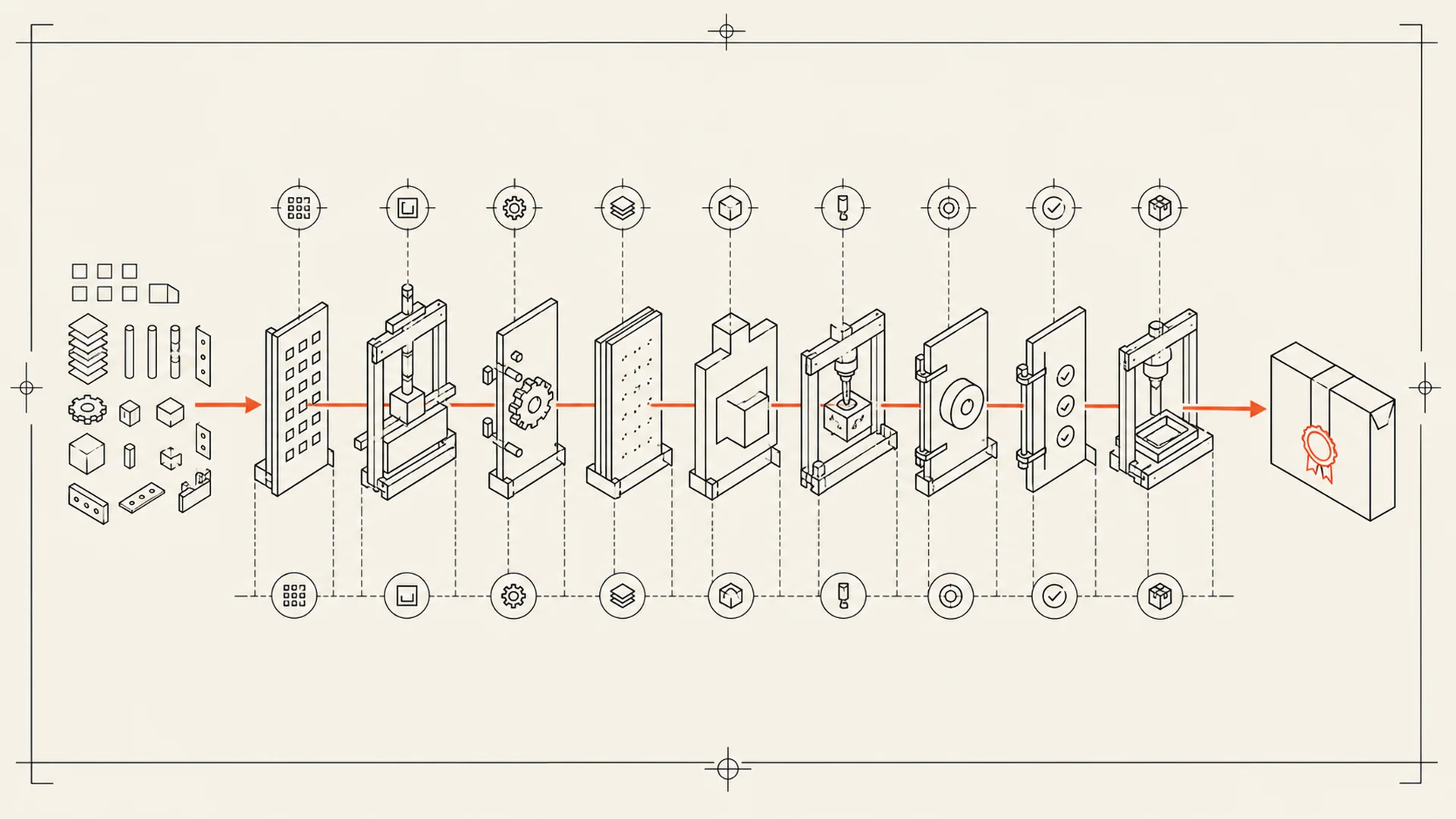
Software productization is the work that turns functioning code into a repeatable product someone can install, understand, trust, update and get help with. The repository may contain the core capability. The product supplies the complete operating path around it.
That distinction matters because software can be technically impressive and still be unusable outside its development environment. A model may run in a notebook. A command-line tool may work after twelve dependencies are installed. A repository may pass its tests on one maintainer's machine. None of those outcomes is yet a consumer desktop product.
A repository proves possibility. A product makes a promise.
A repository answers: Can this capability work?
A product must answer several harder questions:
- Can a non-developer install it?
- Does it work on the operating systems and hardware you claim to support?
- Are the defaults sensible without tuning?
- Can the user understand what touches the network?
- Can an update be authenticated and recovered if it fails?
- Is the interface complete enough to perform the whole job?
- Is there documentation and a support path when reality differs from the happy path?
The Open Source Initiative defines open source through distribution and modification rights, not through product polish, support, price or packaging. That is why a project can be genuinely open source and still require substantial work before an ordinary person can use it. See The Open Source Definition.
The software productization process
At Orthic Labs, the production line has nine stations. The exact implementation changes by product, but the obligations do not.
| Station | Product question | Visible output |
|---|---|---|
| Selection | Is this the right technical ingredient for the job? | Chosen model, library or runtime |
| Rights | Can it legally be redistributed and combined? | License inventory and notices |
| Optimization | Will it run on normal customer hardware? | Converted, quantized or reduced artifacts |
| Runtime | Can dependencies be made deterministic? | Packaged local runtime and fixed versions |
| Workflow | Can a person finish the job without a terminal? | Interface, defaults, errors and recovery |
| Packaging | Can it install and uninstall cleanly? | Windows installer and macOS application bundle |
| Trust | Can the operating system verify its origin and integrity? | Signed binaries and notarized macOS distribution |
| Delivery | Can updates arrive without replacing the customer's rights? | Signed update channel and rollback plan |
| Operation | Can the product survive contact with real machines? | QA, documentation, compatibility work and support |
No single station creates the product. The value is the complete chain.
Why model selection is product work
“Use the best model” is not a usable requirement. A desktop product has constraints: memory, download size, latency, CPU instruction sets, GPU availability, language coverage, license terms and output quality on the actual task.
A larger model may score better in isolation but make the installer impractical. A smaller model may start quickly but fail on the inputs the product exists to handle. Productization means choosing against the whole workflow, then documenting the boundary rather than hiding it.
Why packaging is more than making an installer
An installer is the front door to a lifecycle. It must put files in predictable places, request only necessary permissions, preserve user data across updates, remove application files cleanly, and identify the publisher to the operating system.
On Windows, code signing connects the package to a publisher identity and participates in the platform's trust systems. On macOS, Developer ID signing and notarization let Gatekeeper evaluate software distributed outside the App Store. Signing does not prove that software has no bugs; it proves origin and detects changes after signing. A later Orthic note will explain that boundary in buyer-readable terms.
Why a user interface is not decoration
Wrapping a command in a window is not enough. The interface must carry decisions the repository leaves to the operator:
- Which input formats are accepted?
- Where will output be written?
- What happens when a model or dependency is missing?
- Which operations need a network connection?
- How does the user stop, retry or recover a job?
- What is free, what is paid, and what remains available after purchase?
The interface is where technical capability becomes a legible agreement.
What are you paying for when the ingredient is free?
You are not paying for Orthic to pretend it invented an upstream model or library. You are paying for the selection, integration, testing, packaging, signing, updating, documentation and support that make the ingredient usable as one coherent tool.
Open source is an ingredient, not an installer.
That does not make source-only distribution inferior. Developers may prefer direct access to a repository because it gives them control and modifiability. Productization serves a different need: the person who wants to perform the job, not maintain the toolchain.
A practical definition of done
A software project is productized when a supported user can move from the official download to a successful first result without reconstructing the developer's environment.
Before calling it finished, check:
- The supported operating systems and hardware are explicit.
- Installation, updating and removal are tested.
- Core workflows work without hidden setup.
- Network use is disclosed by action.
- User data has a documented location and export path.
- Errors identify the failed step and a recovery action.
- Pricing and license continuity are written in plain language.
- Every distributed binary is traceable to a release.
- Documentation matches the shipped version.
- A support route exists.
That checklist is less exciting than a model demo. It is also the part customers live with.
Mistakes to avoid
Treating the demo machine as the minimum requirement. Test on ordinary supported hardware, clean operating-system accounts and constrained storage.
Hiding external dependencies. If a workflow calls an API, fetches a URL or depends on a provider account, state it at the point of use.
Signing only the outer installer. The complete distribution and update chain needs an authenticated design.
Promising “lifetime” without defining version and update terms. Durable access and unlimited future service are different promises.
Calling a public repository customer support. Issues and discussions can be useful, but a finished product needs documentation aimed at the person doing the job.
Frequently asked questions
Is software productization the same as software development?
No. Development creates or changes the capability. Productization makes that capability repeatable for a defined customer: packaging, workflow, defaults, distribution, licensing, updates, documentation, QA and support.
Can open-source software be a commercial product?
Yes. Open-source terms govern rights to source and redistribution. A commercial product can charge for packaged binaries, services, support, hosted operation or proprietary additions when its licenses and disclosures permit it.
Does a graphical interface make a project productized?
Not by itself. A graphical interface can improve access, but the product still needs reliable installation, complete workflows, errors, updates, documentation, compatibility testing and support.
When should you use the repository instead?
Use the repository when you want to inspect or modify source, control dependencies, contribute upstream, or operate the toolchain yourself. Use a productized build when your priority is doing the job with a supported installation and update path.
Inspect the output
See the RightSuite catalog for the desktop products that leave this production line. Then compare open source and commercial software or use our seven-question local-first test to inspect the architecture around a product.
About Orthic Labs: We are an independent software publisher. Read how Orthic Labs works and why we treat open-source ingredients as the start of a product, not the finished product.