Orthic Labs / Notes / Productization
Productization · open source AI model desktop app
How an Open-Source AI Model Becomes a Desktop App
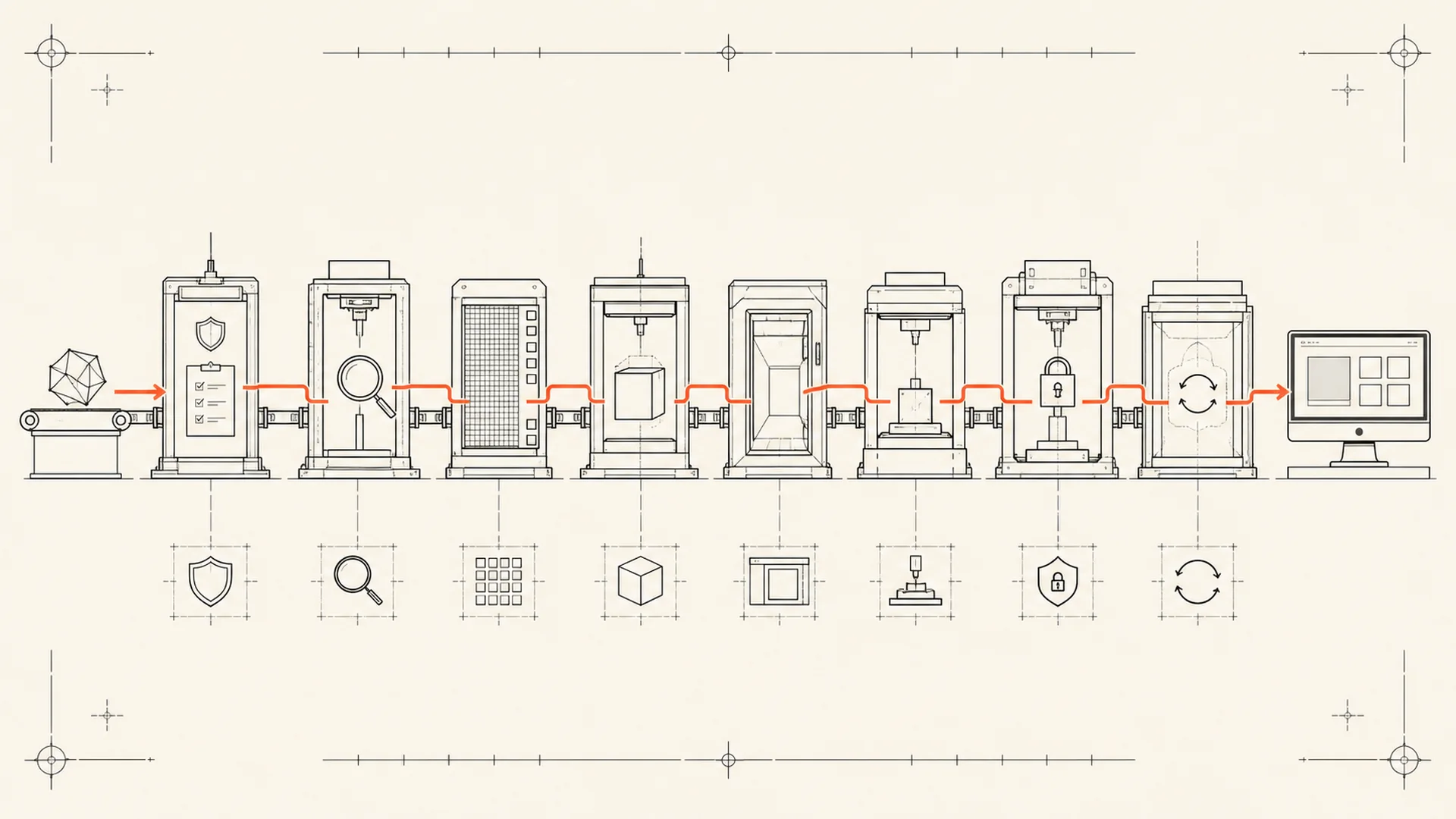
An open-source or openly available AI model becomes a desktop app only after rights review, task evaluation, optimization, runtime packaging, interface design, hardware testing, signed distribution and an update plan. The model is the core component, not the finished product.
A model demo usually proves that one input can produce one output in a prepared environment. A desktop product must make the same capability repeatable across supported machines, inputs, interruptions and updates without asking the user to maintain the model stack.
1. Verify what “open” permits
Model availability is not enough. Review:
- The model license.
- The code license.
- Dataset or usage restrictions disclosed by the publisher.
- Redistribution rights for weights and converted artifacts.
- Attribution and notice requirements.
- Restrictions affecting commercial use or specific fields.
“Open weights,” “source available” and “open source” are not interchangeable labels. The Open Source Definition is a useful baseline for software rights; AI systems may add separate model, data and artifact questions.
Model cards help expose intended uses, limitations, training information, evaluation and license metadata. Hugging Face documents those expected fields in Model Cards. A missing or vague card is not automatic rejection, but it increases the diligence the product publisher must perform.
2. Define the exact job
“Add AI” is not a product requirement. Define the observable transformation:
- Microphone audio to editable text.
- Scanned page to searchable text.
- Document folder to extracted metadata.
- Code change to evidence-backed review findings.
The job determines the evaluation set. A model selected for a public benchmark may fail on the product's real inputs, languages, document damage, noise, file sizes or hardware constraints.
The product needs acceptance criteria for both quality and failure. What result is good enough? When should the app abstain, warn or ask the user to choose another path?
3. Build a representative evaluation set
Use public, licensed or internally generated test material appropriate to the job. Remove private customer data and do not publish sensitive examples.
Evaluate more than the happy path:
- Short and long inputs.
- Clean and damaged material.
- Supported languages and formats.
- Low-memory hardware.
- CPU-only operation where claimed.
- Cancellation and restart.
- Malformed or unsupported inputs.
The result is a product decision, not a leaderboard screenshot.
4. Optimize for ordinary hardware
Model size, memory use, startup time and sustained latency affect whether local execution is practical. Productization may involve conversion, graph optimization, quantization, hardware-specific runtimes or multiple model tiers.
Quantization maps model values into lower-precision representations to reduce memory and compute requirements, but it can affect accuracy and behave differently across hardware. ONNX Runtime's quantization documentation explicitly treats debugging and accuracy comparison as part of the process.
The correct rule is not “smaller is always better.” It is:
Choose the smallest deployment that meets the product's quality requirement on supported hardware, then test the failure modes introduced by that optimization.
5. Package a deterministic runtime
A model needs code that loads it, prepares input, runs inference and converts output into the product's format. That runtime may depend on native libraries, GPU drivers, language packages, tokenizers, media decoders or platform APIs.
The user should not need to reconstruct the development environment. Package versions deliberately, isolate writable data from application files, and state hardware acceleration as a supported path rather than an optimistic detection trick.
Also plan for first-run assets. Bundling a large model increases installer size. Downloading it later creates a network prerequisite, cache location, integrity check, retry path and removal policy. Either choice becomes part of the interface.
6. Design the complete workflow
A useful product does more than expose a prompt box.
For each job, decide:
- How input enters.
- Where processing occurs.
- How progress is shown.
- How the user cancels safely.
- Where output is written.
- How errors identify the failed stage.
- Which advanced choices remain visible.
- Which defaults prevent unnecessary configuration.
This is the same software productization obligation applied to a model-based runtime.
7. Draw the network boundary
Local inference does not make the entire product network-free. The app may download weights, fetch URLs, validate a license, retrieve updates or call an optional provider.
Use the local-first seven-question test: identify the authoritative state, offline core, exports, continuity, network triggers, optional providers and interface disclosures.
Do not publish one suite-wide privacy absolute. Document each product and action.
8. Test the machine matrix
Desktop products meet hardware diversity immediately. Test:
- Supported Windows and macOS versions.
- x64 and Arm where claimed.
- CPU-only and supported accelerators.
- Minimum and recommended memory.
- Clean installation and upgrade.
- Model-cache migration.
- Low disk space.
- Interrupted downloads.
- Sleep, wake and cancellation.
- Accessibility of the complete workflow.
A model that runs on the build machine has passed one row.
9. Sign the release and update path
The model, runtime and interface arrive as code the user must trust. Sign public Windows and macOS releases, notarize direct-distribution macOS builds, and authenticate automatic update payloads.
A signed installer proves origin and integrity, not model quality or privacy. It is still mandatory distribution work because an altered runtime can change every boundary the product claims.
10. Maintain upstream and downstream obligations
The product inherits change from operating systems, frameworks, runtimes and model sources. Track licenses, vulnerabilities, compatibility and model revisions. Do not replace a model silently if output behaviour materially changes.
Release notes should say what changed: model version, runtime, supported hardware, output behaviour, download size, cache migration and known limitations.
The product is not finished when the first installer works. It is finished when the release can be repeated, verified, supported and updated without reconstructing the lab.
The complete productization checklist
- Rights and notices are verified.
- The job and evaluation set are defined.
- Model quality meets the task threshold.
- Optimization is tested for accuracy and hardware fit.
- Runtime dependencies are deterministic.
- Model delivery and cache behaviour are recoverable.
- The interface completes the whole job.
- Network paths are explicit.
- Supported machines are tested.
- Installers and updates are signed.
- Documentation names limits and external dependencies.
- Upstream changes have an update and rollback policy.
That is what sits between “the model is free” and “the app is ready.”
Frequently asked questions
Can you put any open model into a commercial app?
No. Review the exact model, code and data-related terms, including redistribution, attribution, commercial-use and artifact restrictions. Availability for download is not permission for every use.
Does quantization always make a model faster?
No. Performance depends on model structure, runtime, hardware and quantization format. Lower precision can reduce memory or compute cost, but it can also add overhead or reduce output quality.
Should a desktop app bundle the model?
Bundle it when offline-first installation and predictable versioning outweigh installer size. Download it after install when size or model choice matters, but add integrity checks, progress, retry, storage and removal controls.
Does local inference guarantee privacy?
No. It keeps that inference path on-device, but the application may still use networks for models, URLs, licensing, updates, diagnostics or optional providers. Verify the complete product boundary.
The model is one part
Inspect everything Orthic publishes and the public RightSuite repository. A product is the model, runtime, interface, installer, update system, documentation and support working as one line.
About Orthic Labs: Orthic Labs is an independent software publisher. It turns open-source ingredients into finished, documented and supported desktop software.